Acuitas Marketplace overview
The Acuitas Marketplace is a comprehensive plugin architecture platform designed to extend and enhance the Acuitas application through a modular, scalable ecosystem of third-party components and integrations.
What is the Acuitas Marketplace?
The Acuitas Marketplace serves as a centralized platform that enables:
- Plugin discovery: Browse and discover plugins developed by Ocuco and third-party developers.
- Seamless integration: Enable and manage plugins with minimal configuration and complexity.
- Extension capabilities: Extend core Acuitas functionality with custom workflows and features.
- Event-driven webhook integrations: Enables third-party plugin developers to subscribe to Acuitas events by enabling the respective webhook.
High-level architecture
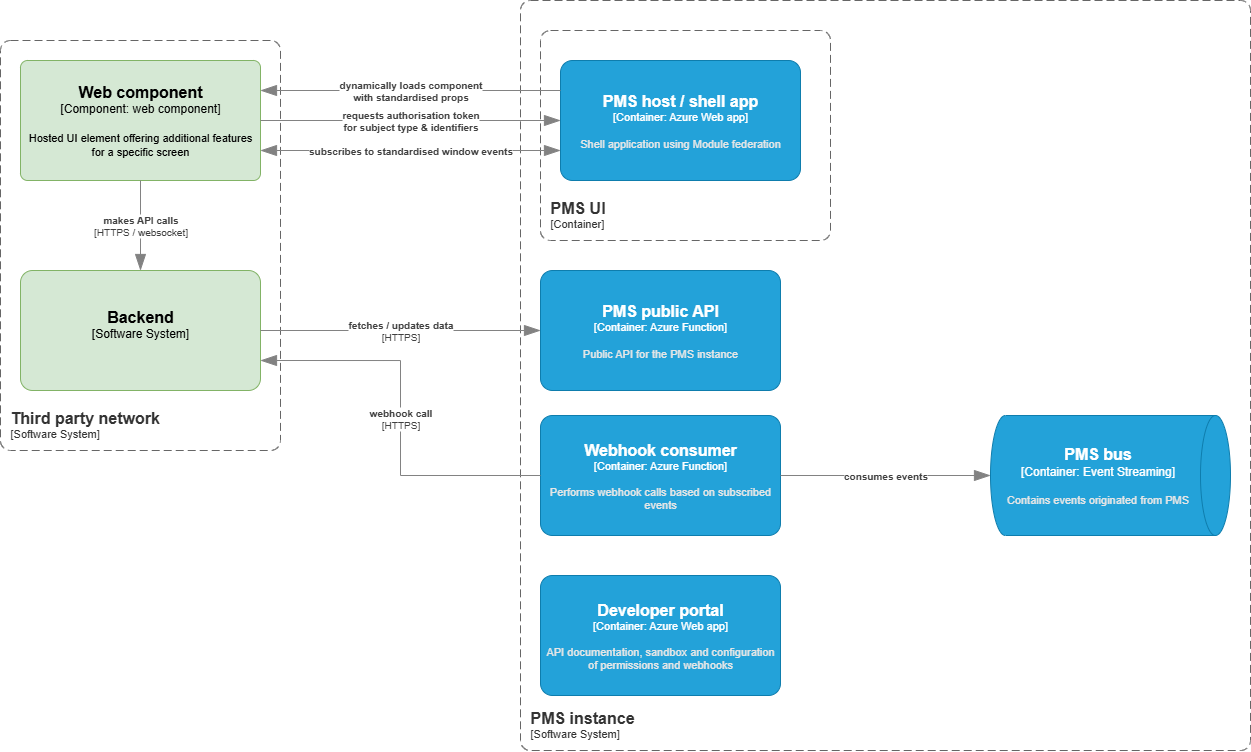
The Acuitas Marketplace follows a distributed architecture pattern that ensures scalability, security and maintainability.
Core components
Marketplace plugin registry
The central hub that manages the entire plugin ecosystem:
- Plugin registry and metadata management.
- Version control and distribution.
- Security scanning and validation.
Plugin runtime engine
The execution environment for plugins within Acuitas applications:
- Dynamic plugin loading.
- Resource management and isolation.
- Event system and lifecycle management.
API gateway
Standardised interface layer that provides:
- Unified API endpoints for plugin interactions.
- Request routing and load balancing.
- Authentication and rate limiting.
- Monitoring and analytics collection.
Configuration service
Centralised configuration management:
- Plugin-specific settings and preferences.
- Environment-specific configurations
- Real-time configuration updates.
Integration Patterns
- Web Components
- API Integration
- Webhooks
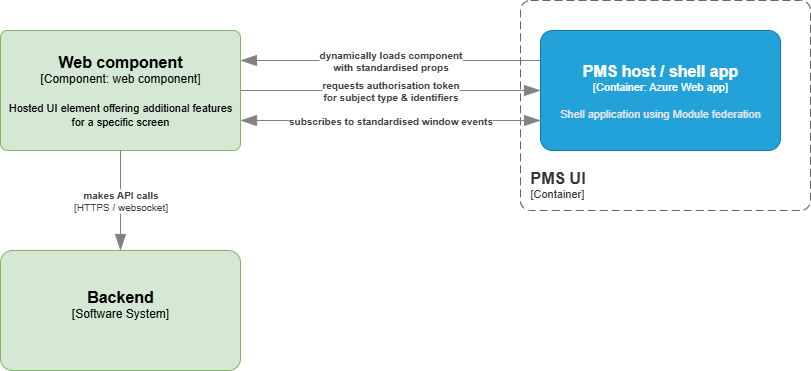
Integrate web components directly into Acuitas 3's existing UI screens for a truly native look and feel.
- Using the internal plugin registry, the PMS UI determines if the customer added external plugins for the screen or menu that is rendered.
- Using module federation, the PMS UI can dynamically load the external web components configured in the plugins.
- The loaded component receives a set of standardized properties and attributes for the screen and context in which it is loaded.
- From that point on, the third-party component can interact with the rest of the screen using standardized browser (window) events.
- Styling and UX guidelines are available to make the look and feel consistent
The flow to retrieve the authentication token for access to the Acuitas Marketplace API is:
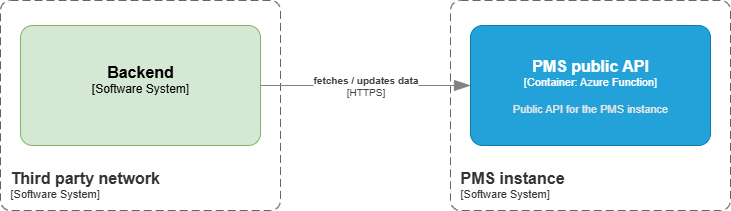
The public API provides controlled access to Acuitas 3 data and functionality for plug-ins, secured by OAuth 2.0 and OpenID Connect compliant identity solution.
- Query Acuitas data:
- Retrieve various data points from Acuitas 3 (for example, patient records, appointments, scans).
- Access is controlled by specific read scopes (for example,
patient.insurance.read,appointment.history.read).
- Update Acuitas data:
- Modify existing data within Acuitas 3 (for example, update appointment information).
- Requires appropriate write scopes (for example,
appointment.,appointment.details.write).
- Role and permission-based access:
- Access tokens issued contain scopes (what the application is allowed to do).
- Your plugin's API calls are authorized based on the requested scopes, ensuring highly granular control.
The flow to retrieve the authentication token for access to the Acuitas Marketplace API looks like:
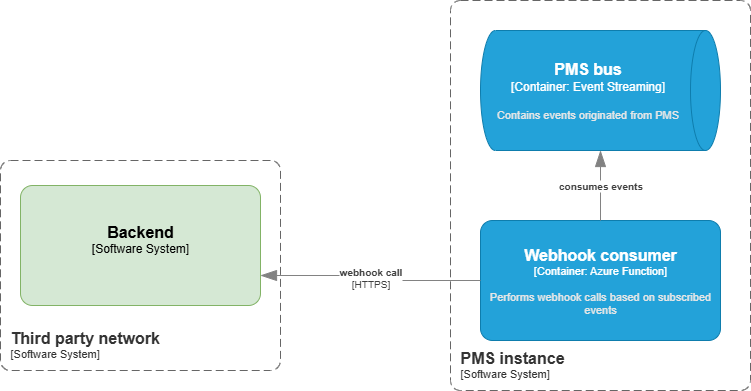
Enables the plugin to react instantly to events happening within Acuitas 3.
- Event-Driven Communication:
- Receive automatic HTTP POST requests to your registered endpoint whenever a specific event occurs in Acuitas 3.
- Comprehensive Event Coverage:
- Subscribe to a wide range of system events (for example,
Appointment created,Scan created).
- Subscribe to a wide range of system events (for example,
- Secure and Authenticated Payloads:
- Webhook calls are secured with a unique shared secret, allowing your system to verify the authenticity of incoming requests (HMAC signature).
- Rich Data Payloads:
- Each webhook payload includes relevant data about the event, enabling your plug-in to process information without additional API calls.
- Configurable Endpoints:
- Register specific URLs within Acuitas 3 for each event type you want to monitor.
- Reliable Delivery Mechanisms:
- Includes retry logic for failed deliveries to ensure high reliability (for example, exponential back off).
Getting started
See Getting started on how to get started creating your own Acuitas Marketplace plugin.
Next steps
Ready to explore the Acuitas Marketplace? Here are some recommended next steps:
- Web Components Guide: Learn about web components and what tools are available to create them.
- Component Framework: Explore the Acuitas Design System.
- Creating Web Components: Create your own web components.
- API Documentation: Review available APIs and endpoints.